


SaaS UX · Start with an outcome
Design an app people can use.
Try a real prototype, see its journey and design choices, then develop your own with an AI assistant.
01 / See the outcome
Try Pocket Garden
Filter the plants, then mark one as planted. This working example was created for Developer Dojo with AI assistance. It is a small browser prototype—not a production SaaS or a Figma/Penpot file.
The prototype resets when reloaded and does not create an account or save your selection.
02 / Work backward
Map what actually happens
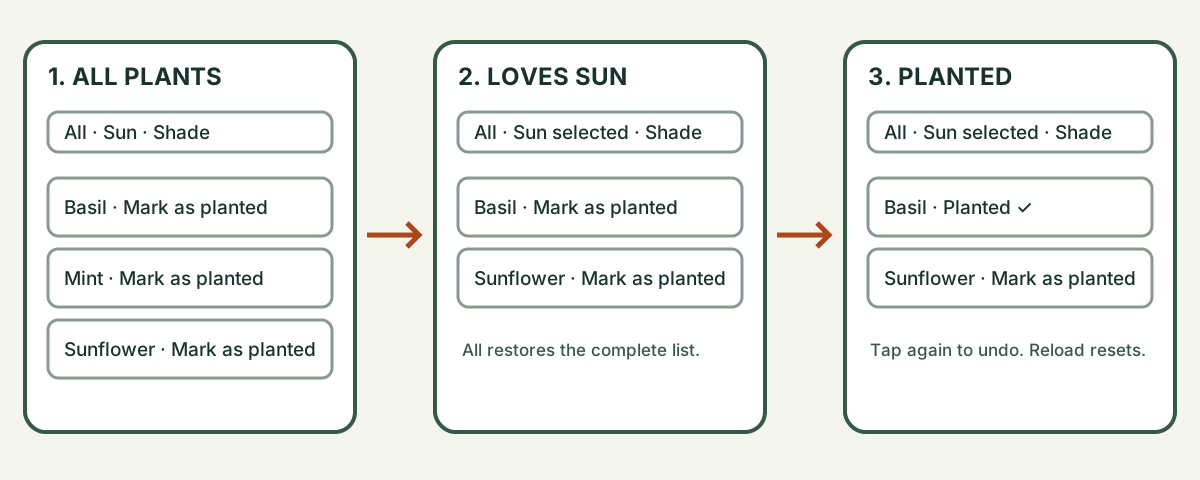
The diagram below is a Dojo-created, editable SVG wireframe of three states of the same screen. It describes the working example rather than claiming a separate design-tool file already exists.
Download the editable SVG wireframe
- Start: see Basil, Mint and Sunflower.
- Choose: select Loves sun to show Basil and Sunflower, or Likes shade to show Mint. Select All plants to return to the complete list.
- Act and undo: mark a plant as planted and tap again to undo. Reloading resets all choices.
The example uses fixed data: it does not demonstrate accounts, a server, an empty result, a payment flow or persistent storage. Add and test those separately if your own concept needs them.
03 / Inspect the design
A small, reusable visual system
These values come from the actual Pocket Garden example’s CSS. Open the full example and inspect its source to see them in context.
#173d2d · header and selected filter#183429 · body text#f4f5eb · page background#aa481c · keyboard outlineThe example uses a system sans-serif font, rounded cards, flexible grids and spaced controls. These are starting choices, not proof of accessibility: test contrast, zoom, focus and labels in your own result.
04 / Your turn
Give your agent a UX brief
Open any AI assistant on a phone or computer, or use a CLI harness you trust. No special plugin, paid design tool or connected account is needed for this prompt. Check your chosen service’s terms and costs.
Ingredients: your goal and audience; the prompt; your chosen assistant and model; and a place to sketch. Optional: use a design tool for your own editable screens. Do not share sensitive customer information with an assistant without permission.
Choose a phone, browser or desktop setup
For the first pass, use an assistant app or browser and sketch on paper. If you already use a CLI, paste the same brief into your trusted harness and review any file or command permissions. See phone, Windows, macOS and Linux setup options.
05 / Build and verify
Turn a sketch into a prototype
Choose a learning resource, create your own boards or frames, and connect a starting screen to a detail screen and back. Test it on your device. These are external provider tutorials; account, access and plan limits may apply.
- Penpot: connect boards and prototype interactions
- Figma: create a low-fidelity clickable photo gallery
- Figma: beginner design course and videos
Optional integrations have their own compatibility, permissions and installation requirements. This kata does not install or connect an MCP server, plugin or skill, and does not claim that an agent can edit your design file.
Check your work
- Try each route, including the way back and any empty or error state your design includes.
- Test on a narrow screen and with a keyboard if available. Check labels, visible focus and readable contrast; check your text colours.
- Compare the prototype to your journey and design choices. Record what you tested, what is untested and what changed.
Quick check: does a screenshot prove a prototype is accessible?
No. A screenshot cannot demonstrate keyboard operation, focus order, labels or screen-reader behavior. Test the actual interactions and seek feedback from people using assistive technology.
Randori: change the goal
Adapt the same approach to a reading list for a busy commuter. Design the empty state and a clear way to undo an action, then ask someone to attempt your journey. Record what you learned; do not invent results from a usability test.
Explore more katas · Build the Pocket Garden prototype · Explore more fields



